
Theme
WordPress sites
NitHost provisions WordPress with database credentials, WordPress administrator account options, and panel-side maintenance tools.
Who can use this page? Site Manager create WordPress sites; users with manage can use WordPress Tools.
WordPress administrator accounts belong to your WordPress website and are separate from your NitHost customer account.
Create a WordPress site
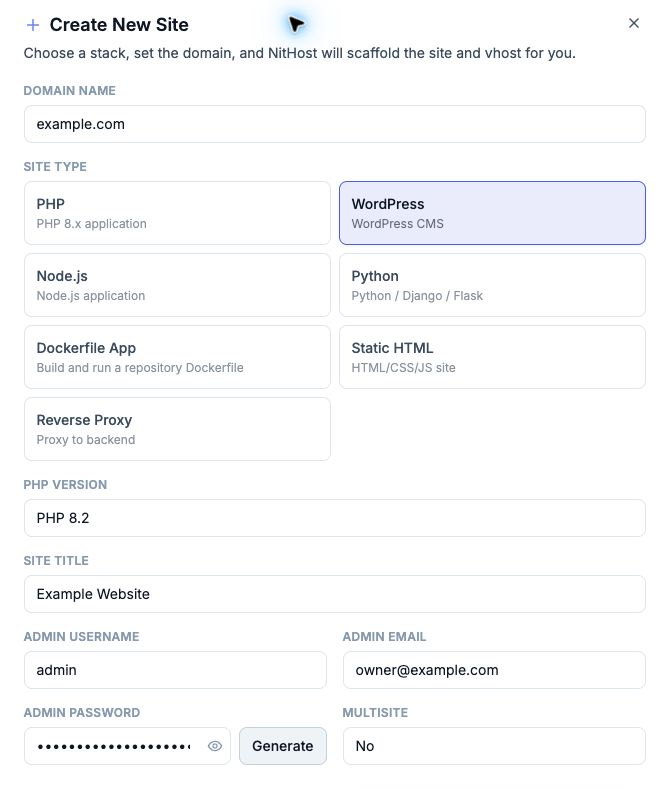
- Create a site → type WordPress
- Set PHP version, Site title, Admin username, Admin email, Admin password (or Generate)
- Multisite: No or Subdirectory network
- Create Site
Copy the one-time database and WordPress login details. Finish the WordPress installer if prompted, or sign in with the provisioned WordPress account.
Promote an existing PHP site
If a PHP site’s docroot already contains WordPress:
- Open the site — banner offers Promote to WordPress
- Confirm — NitHost flips the type and runs runtime prep (mu-plugins, config hardening)
WordPress Tools
Site Actions → WordPress Tools (WordPress sites):
| Tool | Purpose |
|---|---|
| Fix WordPress Permissions | Repairs ownership/chmod so core/plugin/theme updates can write |
| Enable Direct Updates | Sets FS_METHOD=direct so updates do not ask for FTP |
| Repair Redis | Restores object-cache drop-in / Redis config |
| Update WordPress Core | WP-CLI in a temporary container; updates core + verifies checksums |
| Reset admin password | List/reset WordPress administrators from the panel |
Caching
- FastCGI page cache with logged-in and checkout bypass
- Redis object cache — DB auto-assigned; use Repair Redis if the drop-in is missing
Purge after theme/plugin changes — Cache.
Security defaults
- Panel can keep
wp-config.phpimmutable (chattr +i) where file locking is available - File Manager lock/unlock toggles the immutable bit on sensitive files
- Prefer Development protection on staging
Multisite
Created when Multisite = Subdirectory network. Vhost and path rules differ from single-site — manage network admin inside WordPress after install.
Database
WordPress uses a linked MariaDB database by default when provisioned. See Databases.